3-Ring Binder Canva Mockup with 2-Inch Spine: A Designer's Toolkit
Creating a polished, professional presentation for your digital products is no longer a luxury—it's a necessity. For designers, course creators, and small business owners, showing your work in a realistic context can be the difference between a scroll-past and a sale. This is where a high-quality mockup becomes an invaluable asset. The 3-Ring Binder Canva Mockup with a 2-inch spine is specifically engineered to bridge the gap between your flat digital designs and a tangible, desirable product in your customer's mind.
What Makes This Binder Mockup Stand Out?
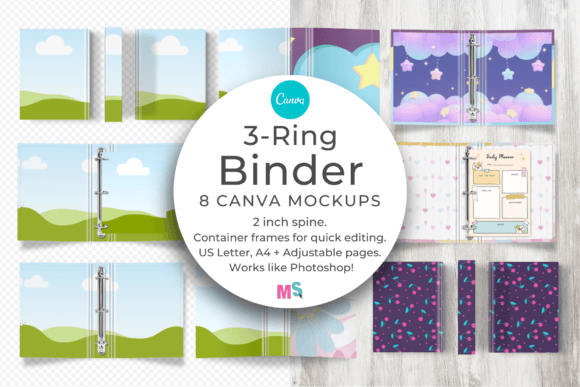
At its core, this is a collection of 8 individual mockups designed entirely within Canva. Forget complex Photoshop layers or expensive software subscriptions. The appeal lies in its accessibility and depth of customization. You're not just dropping your design onto a static image. The binder objects—cover, spine, rings, and pages—are separate, movable elements. This means you can adjust the composition to tell the perfect visual story for your brand.
A critical detail for realism is the lighting. The separate drop shadows for each binder component are a game-changer. You can darken or lighten these shadows to precisely match the tone and depth of your own artwork, ensuring your pattern design or workbook cover looks naturally integrated, not pasted on. Similarly, the editable spine creases add a layer of authentic texture, allowing you to control the visual weight and wear of the binder. The inclusion of three page sizes—an adjustable page, US Letter, and A4—means your mockup is globally relevant, whether you're selling planners in the US or training manuals in Europe.
Practical Applications for Creatives and Entrepreneurs
The true value of this design asset is its versatility. It's built for anyone who sells or presents bound materials. Here’s how different professionals can leverage it:
- For Pattern and Surface Designers: Showcase your seamless patterns on a physical product. Display how a floral design wraps around a binder cover or how a geometric pattern looks on the spine and interior pages. This moves your work from the digital realm into a commercial context.
- For Course Creators and Educators: Your course workbook is a key part of the student experience. Use this mockup to present your printable digital products—like training manuals, journal prompts, or exercise trackers—with the professionalism they deserve. It builds perceived value and trust.
- For Etsy Sellers and Publishers: The mockups are sized at 3000 x 2000 pixels, perfectly optimized for standard shop graphics on platforms like Etsy. Create stunning listing images that show your wedding planner, budgeting sheets, or recipe binder in a realistic, lifestyle setting without needing a photo shoot.
- For Brand Strategists and Marketers: Consistency is key to brand identity. Use the mockup to create a suite of branded materials. Show how your brand's typeface and color palette carry through from the cover to the internal checklists, reinforcing a cohesive visual language.
Integrating the Mockup into Your Design Workflow
Think of this tool like a premium font for your product presentations—it elevates everything it touches. The workflow is intentionally simple, mirroring the drag-and-drop functionality designers love. The custom Canva container frames act as clip masks, making it quick and easy to place your designs. This efficiency is crucial for busy creators who need to produce multiple assets for a single product launch.
When using the mockup, consider the principles of visual hierarchy and readability. Your cover design is the hero, but the interior pages matter too. Use the adjustable page mockup to highlight a key spread, like a beautifully designed monthly calendar or a detailed checklist. The ability to move elements allows you to create depth—perhaps layering a page slightly behind the cover to suggest the contents within.
This isn't just about making a pretty picture; it's about strategic communication. A well-executed mockup influences brand perception, signaling quality and attention to detail. It enhances audience engagement by helping potential customers visualize themselves using your product. For those familiar with editorial design or packaging design, the process will feel intuitive—it's about arranging elements to guide the viewer's eye and tell a compelling story.
Choosing and Using Your Mockup Effectively
Before diving in, take a moment to evaluate the fit. Does the 2-inch spine width suit your content? A thicker spine implies more pages, which can enhance the perceived value of a comprehensive workbook or manual. Test your designs within the mockup early in your process. See how your chosen font pairing for headings and body text holds up at the small scale of a page preview. Check the readability of your interior designs against the page background and shadow effects.
Remember, this is a commercial-use asset. The license typically allows you to use the final mockup images in your shop, on your website, and across your social media graphics for promotion. It's a creative font for your product imagery—use it to build a consistent and recognizable style across all your digital and print touchpoints. By leveraging this 3-Ring Binder Canva Mockup, you're not just displaying a product; you're crafting an experience that resonates with your audience and supports your business goals.